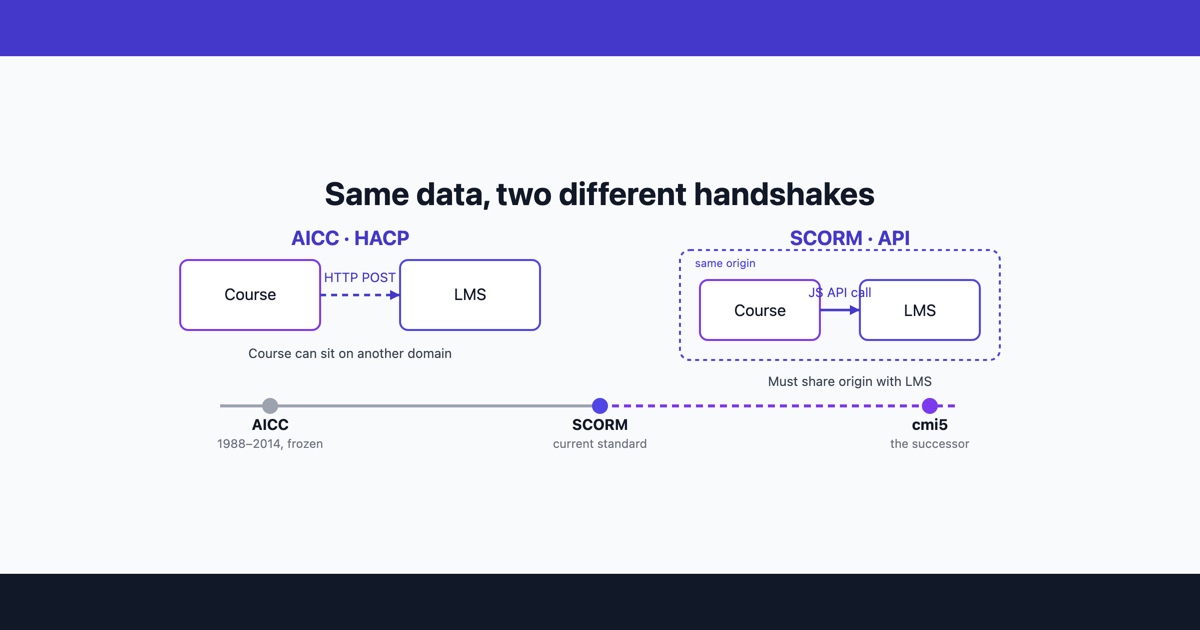
Open the import settings of an older LMS and you will often find AICC sitting next to SCORM 1.2 and SCORM 2004, as if it were a live choice. It is not, really. The committee that wrote it closed in 2014, and nobody is developing it any more. But AICC courses are still out there, still being uploaded, and the LMS admin who inherits one needs to know what it is and why it behaves differently from everything else in the catalog.
Where AICC came from
AICC stands for the Aviation Industry CBT (Computer-Based Training) Committee. It was formed in 1988 by aircraft manufacturers, airlines and training vendors who had a practical problem: an airline buying aircraft from more than one manufacturer ended up with training delivered on incompatible systems. The committee wrote guidelines so that a course from one vendor could be managed by another vendor’s system.
The document that matters for this comparison is CMI001, the AICC’s CMI Guidelines for Interoperability. CMI stands for computer-managed instruction, the older name for what we now call a learning management system. CMI001 defined three things:
- how a course is described to the management system, in a set of plain-text files
- what data the course and the system exchange: who the learner is, where they stopped, their status, score and time
- how that data travels between them
It was written before web browsers were the obvious delivery platform, and the earliest versions assumed files exchanged on a local disk or network. The web came later, as an additional binding.
HACP: tracking over plain HTTP
The web binding is HACP, the HTTP-based AICC/CMI Protocol, and it is the part people usually mean when they say “AICC” today.
The LMS launches the course (an assignable unit, or AU, in AICC terms) by opening its URL with two parameters appended: aicc_sid, a session identifier, and aicc_url, the address the course should talk back to. From then on the course sends ordinary HTTP POST requests to that address. Each request carries a command, the session ID, a version field and, when the course is reporting something, an aicc_data field.
The commands are a short list. GetParam asks for the learner’s data at the start, PutParam sends status, score, time and bookmark back, and ExitAU ends the session. There are optional ones for comments, objectives, interactions and performance data.
What comes back is not XML or JSON but a block of text in an INI-file layout, with sections in square brackets. A trimmed response to GetParam looks like this:
error=0
error_text=Successful
aicc_data=[Core]
Student_ID=jsmith
Student_Name=Smith, Jane
Lesson_Location=
Credit=C
Lesson_Status=N
Score=
Time=00:00:00
[Core_Lesson]
Lesson_Status=N is “not attempted”. The course would answer later with a PutParam carrying, say, Lesson_Status=C and a score. The [Core_Lesson] section is free-form state the course keeps for itself, the same job cmi.suspend_data does in SCORM.
How AICC differs from SCORM
If those field names look familiar, it is because SCORM borrowed them. When ADL put SCORM 1.2 together, its run-time data model was taken from the AICC’s CMI data model. Lesson_Status became cmi.core.lesson_status, Lesson_Location became cmi.core.lesson_location, and the status vocabulary (passed, completed, failed, incomplete, browsed, not attempted) carried straight across. What changed was everything around the data.
- Communication
- AICC (HACP) sends HTTP requests from the course to a URL the LMS gave it. SCORM uses a JavaScript object,
APIin 1.2 orAPI_1484_11in 2004, that the LMS places in a parent or opener window, and the course calls it directly. - Where the course can live
- Because HACP is just a network request to a known URL, an AICC course did not have to be served from the LMS’s own domain. A SCORM course has to find the API object in a frame it is allowed to reach, which in practice means the same origin as the LMS. This is the one advantage of AICC that people still cite.
- Course description
- AICC uses a set of plain-text files, mostly comma-delimited:
.au(the assignable units),.crs(the course),.cst(course structure) and.des(descriptors) are required, with optional files for prerequisites, objectives and completion rules. SCORM uses one XML file,imsmanifest.xml, at the root of a zip. - Data format
- AICC exchanges INI-style text. SCORM passes name and value strings through the API, one element at a time.
- Status
- AICC is frozen; the committee dissolved in December 2014. SCORM 1.2 and SCORM 2004 are what current LMSs and authoring tools are built around.
For comparison with the AICC files above, here is roughly the smallest manifest a SCORM 1.2 package can get away with:
<manifest identifier="safety-briefing" version="1.0"
  xmlns="http://www.imsproject.org/xsd/imscp_rootv1p1p2"
  xmlns:adlcp="http://www.adlnet.org/xsd/adlcp_rootv1p2">
  <metadata>
    <schema>ADL SCORM</schema>
    <schemaversion>1.2</schemaversion>
  </metadata>
  <organizations default="org1">
    <organization identifier="org1">
      <title>Safety briefing</title>
      <item identifier="item1" identifierref="res1">
        <title>Safety briefing</title>
      </item>
    </organization>
  </organizations>
  <resources>
    <resource identifier="res1" type="webcontent"
      adlcp:scormtype="sco" href="index.html">
      <file href="index.html"/>
    </resource>
  </resources>
</manifest>
The course then talks to the LMS in calls such as LMSInitialize(""), LMSGetValue("cmi.core.lesson_status"), LMSSetValue("cmi.core.lesson_status", "completed"), LMSCommit("") and LMSFinish(""). Same data, delivered through a JavaScript function call rather than a form post.
Why some LMSs still list it
An LMS keeps AICC support for the same reason anyone keeps a legacy feature: removing it breaks somebody. Several groups still depend on it.
Organizations with long course catalogs, aviation among them, own AICC courses that were expensive to build and still say the right things. Re-authoring them is a project nobody has budget for while they still launch.
Some off-the-shelf content providers delivered their libraries as AICC because of the cross-domain point above. The LMS only receives the small descriptor files, and the content stays on the provider’s servers, where they can update it and control access to it.
Procurement checklists also tend to list every standard the buyer has ever heard of, and an LMS vendor that drops AICC from its feature list may lose a tender over it.
None of that makes AICC a sensible choice for a new course. If you are building something today, the decision is between SCORM 1.2 and SCORM 2004 and, if your LMS supports it, cmi5. Work on cmi5 actually began inside the AICC and was carried on by ADL after the committee closed, which makes it the nearest thing AICC has to a direct successor.
What to do with an old AICC course
Start by looking at what you actually have. An AICC course is usually a folder or zip with the four descriptor files and a content folder, or sometimes only the descriptor files, with the .au file pointing at a URL on someone else’s server. That second case matters: if the remote server is gone, the course is gone, and no amount of repackaging will bring it back.
If it still works
If your LMS imports it, it launches and it records completion, there is no urgent reason to touch it. Check a few things before you leave it alone:
- The launch URL in the
.aufile uses HTTPS. HACP sends the session ID and the learner’s results in the request, and a course still on plain HTTP sends them unencrypted, which modern browsers block from an HTTPS LMS page as mixed content. - The LMS vendor still supports AICC on your version, and has not marked it deprecated in the release notes.
- Completion and score reach the reports for a test learner, not just the launch.
If it needs to move to SCORM
There is no reliable automatic conversion from AICC to SCORM, because the descriptor files are the easy part. The course’s own code is written to send HTTP posts, and a SCORM LMS will never give it an aicc_url to post to. Something has to replace that communication layer.
Your options, from least to most work:
- Republish from the source. If the course was built in an authoring tool and the project file still exists, open it and publish again with SCORM 1.2 or 2004 as the output. This is by far the easiest route, and the reason to ask the original vendor for project files before anything else.
- Rewrite the tracking. A developer can rewrite the course’s tracking code to call the SCORM API instead of posting to HACP. Because the data model is nearly the same, the mapping is mostly a matter of renaming fields, but it has to be tested on every page that reports anything.
- Rebuild it. When there is no source and no one to touch the code, take the content itself (the text, the images, the questions) and build a new SCORM course from it. For a course that was mostly reading and a quiz, this is often quicker than it sounds.
Whichever route you take, test the new package before you upload it. An AICC course that was half-working can fail in new ways once it depends on the SCORM API, and the SCORM tester will play the package in your browser, show which SCORM version it declares and log every call it makes, so you can see a completion being set rather than hoping the LMS caught it. It will not open the old AICC files themselves; the tester only recognizes SCORM, xAPI and cmi5 packages.
Before you retire the AICC version, export its completion records from the LMS. Learner history is attached to the course entry, and replacing that entry with a new SCORM one can leave the old records orphaned or, on some systems, gone.