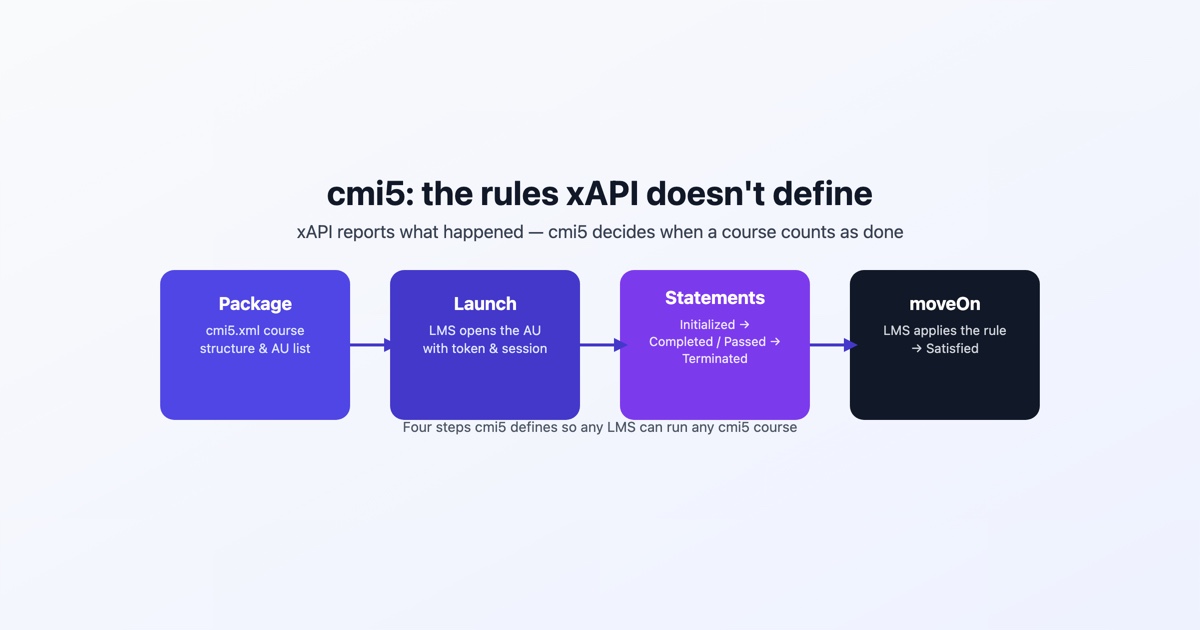
cmi5 is a set of rules for running xAPI courses from an LMS. xAPI on its own says how a learning experience reports what happened, as statements sent to a Learning Record Store, but it says nothing about how a course is imported, how the LMS starts it, or when the LMS should consider it done. cmi5 fills those three gaps. In xAPI terms it is a profile: a published agreement about which verbs to use, in what order, with what context, so that any conforming LMS can run any conforming course.
The specification was started by the AICC and is now maintained by ADL, the same organization behind SCORM and xAPI. The name comes from the AICC’s old “Computer Managed Instruction” work, and the lowercase spelling is the official one.
What cmi5 adds to xAPI
A plain xAPI course can send statements from anywhere, but the LMS has no standard way to receive it as a package, launch it with the right learner identity, or read a result from it. cmi5 defines each of those pieces.
- Packaging. A course is described by a course structure file called
cmi5.xml. It can sit at the root of a zip alongside the content, or be imported on its own with absolute URLs pointing at content hosted somewhere else. - Launch. The LMS opens each assignable unit (AU) with a URL carrying the LRS endpoint, the learner, a registration ID, the activity ID and a one-time URL from which the AU fetches its authorization token.
- Launch data. Before it does anything else, the AU reads a state document the LMS wrote for it, which holds the launch mode, the mastery score, the moveOn rule and a return URL, among other things.
- Statement rules. A fixed set of verbs, the order they may appear in, and context the LMS can rely on when it decides whether the learner has finished.
- LMS rules. What the LMS must do with those statements: record satisfaction, mark abandoned sessions, and allow units to be waived.
The course structure file
An assignable unit is the cmi5 equivalent of a SCO: one launchable piece of content that reports its own results. A course is one or more AUs, optionally grouped into blocks. This is a minimal cmi5.xml for a course with a single AU:
<?xml version="1.0" encoding="utf-8"?>
<courseStructure xmlns="https://w3id.org/xapi/profiles/cmi5/v1/CourseStructure.xsd">
  <course id="https://example.com/courses/fire-safety">
    <title><langstring lang="en-US">Fire safety basics</langstring></title>
    <description><langstring lang="en-US">Evacuation routes and extinguisher use.</langstring></description>
  </course>
  <au id="https://example.com/courses/fire-safety/au/1"
      moveOn="CompletedAndPassed"
      masteryScore="0.8"
      launchMethod="AnyWindow">
    <title><langstring lang="en-US">Module 1</langstring></title>
    <description><langstring lang="en-US">Evacuation routes.</langstring></description>
    <url>index.html</url>
  </au>
</courseStructure>
IDs are IRIs, not short strings, which is one of the first things that trips up someone used to SCORM identifiers. masteryScore is a decimal between 0 and 1, so 80 percent is written 0.8. launchMethod tells the LMS whether the AU may open in a frame or popup of its choosing (AnyWindow) or needs a window of its own (OwnWindow).
The statement order
This is where cmi5 is strict, and where most conformance failures come from. Within one session, the statements arrive in this order:
- Launched, sent by the LMS when it opens the AU. The course never sends this one.
- Initialized, sent by the AU as its first statement, after it has fetched its token and read the launch data.
- Completed, Passed or Failed, sent by the AU when the learner meets the condition. Completed means the learner has experienced the required content; Passed and Failed are judged against the mastery score, if one was set.
- Terminated, sent by the AU as its last statement. Nothing may follow it in that session.
Between Initialized and Terminated the AU may send any other xAPI statements it likes, such as answered questions or watched videos. cmi5 calls these “allowed” statements, and the LMS does not use them to decide anything.
A few rules sit around that sequence. Completed is recorded once per registration: an AU should not send it again on a later attempt. The same goes for a pass. If the learner simply closes the browser, there is no Terminated statement, and the LMS records the session as Abandoned itself. When the LMS decides the learner has met the course’s requirements it sends Satisfied, and if an administrator excuses a learner from a unit it sends Waived. Those three are LMS statements; a course that sends them is not conformant.
Each cmi5 defined statement carries context the LMS uses to recognize it: a category activity marking it as a cmi5 statement, the registration, and a session ID shared by every statement in that session. An Initialized statement from the AU above looks like this:
{
  "actor": { "objectType": "Agent", "account": { "homePage": "https://lms.example.com", "name": "learner-42" } },
  "verb": { "id": "http://adlnet.gov/expapi/verbs/initialized", "display": { "en-US": "initialized" } },
  "object": { "id": "https://example.com/courses/fire-safety/au/1", "objectType": "Activity" },
  "context": {
    "registration": "c3c1f4b2-8a7e-4d3a-9f0e-2b6d1a5e7c90",
    "contextActivities": {
      "category": [ { "id": "https://w3id.org/xapi/cmi5/context/categories/cmi5" } ]
    },
    "extensions": {
      "https://w3id.org/xapi/cmi5/context/extensions/sessionid": "8d2a6f1e-3b4c-4e5f-a6b7-c8d9e0f1a2b3"
    }
  }
}
The actor and registration are not invented by the course. They arrive on the launch URL, and the AU copies them, together with the context template from the launch data, into every statement it sends.
moveOn: how the LMS decides a unit is done
Every AU carries a moveOn value in cmi5.xml. It tells the LMS which statements count as finishing that unit, and so when a block or the whole course becomes satisfied.
- Completed needs a Completed statement.
- Passed needs a Passed statement.
- CompletedAndPassed needs both.
- CompletedOrPassed needs either.
- NotApplicable means nothing the learner does in the unit is required, and the LMS treats it as satisfied.
The useful consequence is that the decision lives in the LMS, not in the course. In SCORM the content reports a status and the LMS largely trusts it. In cmi5 the content reports facts, and the LMS applies the rule the course author declared. An AU set to Passed that sends Completed and Failed has not finished, however its own screen describes the result.
The mastery score works the same way. If the LMS passes a masteryScore in the launch data, the AU must use that number to judge pass or fail rather than whatever threshold was built into the content. An administrator can change the pass mark without republishing the course.
Who supports cmi5
Support is narrower than SCORM’s and worth checking before you commit to it. On the authoring side, Articulate Storyline 360 can publish to cmi5, and several other tools have added it as an output option. On the platform side, Rustici’s SCORM Cloud and Engine run cmi5 courses, and so does any LMS built on Engine. Moodle does not support cmi5 out of the box. ADL publishes a conformance test suite, called CATAPULT, that content and LMS vendors use to check their implementations.
The practical test is the one that matters: ask your LMS vendor whether it imports a cmi5.xml package and enforces moveOn, and try a sample course in it before building a whole curriculum around the format. An LMS that “supports xAPI” may only mean it has an LRS, which is not the same thing.
When to choose cmi5 over SCORM 1.2 or 2004
SCORM works by having the course find a JavaScript API object in a parent browser window and call it, which means the content has to be served in the browser from the LMS. cmi5 talks to the LRS over HTTP, so the content can live on another domain, inside a mobile app, or anywhere that can make a web request. That one difference drives most of the decision.
Choose cmi5 when:
- the content has to be hosted outside the LMS, on your own servers or a CDN, and you still want the LMS to launch it and track it;
- you want detailed xAPI data about what learners did inside a course, sent to an LRS, alongside a clear pass or completion the LMS can act on;
- the course is part of a native mobile app or another non-browser experience that still has to report to an LMS;
- you are starting new content for an LMS you have confirmed supports cmi5.
Stay with SCORM when:
- the course has to run in more than one LMS, or in a client’s LMS you do not control, because SCORM 1.2 is still the format nearly every LMS imports;
- the content is a self-contained course that only needs completion, a score and a bookmark;
- you depend on SCORM 2004 sequencing and navigation rules, which cmi5 deliberately does not reproduce. cmi5 leaves the order of units to the LMS.
There is no penalty for picking SCORM 1.2 for a simple course that has to work everywhere. cmi5 earns its place when you need what it adds, not as a default upgrade.
Checking what kind of package you have
A zip with cmi5.xml at the root is a cmi5 package; one with imsmanifest.xml is SCORM; one with tincan.xml is an older xAPI launch format that predates cmi5 and has none of its LMS rules. If you have been handed a package and are not sure which it is, the free SCORM package tester will read it and name the format. It plays SCORM packages and logs their API calls, but it does not launch a cmi5 course, so for a cmi5 unit it tells you what you have rather than running it.