Most authoring tools ask the same question on the export screen: SCORM 1.2 or SCORM 2004? The
honest answer depends less on which standard is newer than on what your LMS does with each one,
and on whether your course needs anything 1.2 cannot express. Both are published by ADL, both
package a course as a zip with an imsmanifest.xml at the root (what goes in that zip), and both have the course talk to
the LMS through a JavaScript object the LMS puts in the browser. Past that, the two differ in ways
that show up in your reports.
The runtime API has different names
A SCORM course does not send data anywhere by itself. It looks for an object the LMS has placed in a parent window or opener, then calls functions on it. The object and every function on it were renamed in 2004, so a course built for one version cannot find the other’s API at all.
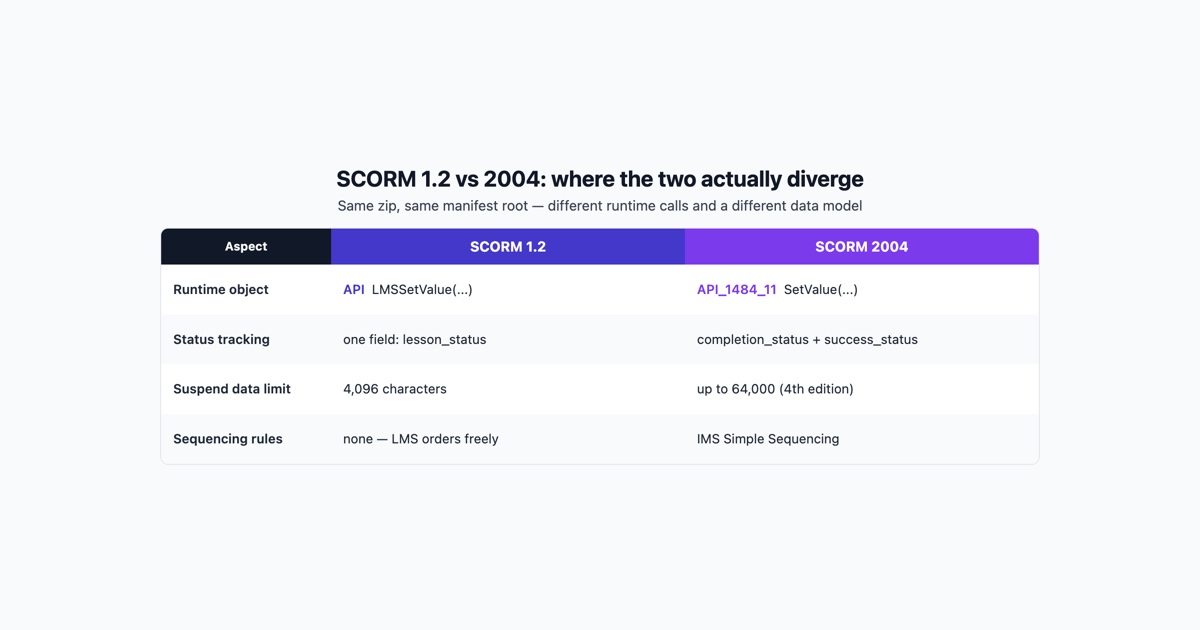
In SCORM 1.2 the object is called API and every function carries an LMS prefix. In SCORM 2004
the object is called API_1484_11, after the IEEE 1484.11 standard the data model is based on, and
the prefix is gone. Here is the same short session written both ways:
// SCORM 1.2
var api = findAPI(window);              // walks parent frames looking for window.API
api.LMSInitialize("");
api.LMSSetValue("cmi.core.lesson_status", "passed");
api.LMSSetValue("cmi.core.score.raw", "85");
api.LMSSetValue("cmi.core.session_time", "0000:12:30.00");
api.LMSCommit("");
api.LMSFinish("");

// SCORM 2004
var api = findAPI(window);              // walks parent frames looking for window.API_1484_11
api.Initialize("");
api.SetValue("cmi.completion_status", "completed");
api.SetValue("cmi.success_status", "passed");
api.SetValue("cmi.score.scaled", "0.85");
api.SetValue("cmi.score.raw", "85");
api.SetValue("cmi.session_time", "PT12M30S");
api.Commit("");
api.Terminate("");
The rest of the functions follow the same pattern: LMSGetValue became GetValue,
LMSGetLastError became GetLastError, and so on. LMSFinish is the one whose new name is not
obvious: it is Terminate. The error codes changed too, so an error handler written against 1.2
numbers will misreport under 2004.
Completion and success are separate in 2004
This is the difference most people meet first, usually as a report that says “incomplete” for a learner who passed.
SCORM 1.2 has one status field, cmi.core.lesson_status, with six values: passed, completed,
failed, incomplete, browsed and not attempted. Whether the learner finished the material and
whether they passed the test are squeezed into that one value. A learner who reads every page and
then fails the quiz is failed; whether they finished reading is lost.
SCORM 2004 splits it in two:
cmi.completion_status:completed,incomplete,not attemptedorunknown. Did the learner get through the content?cmi.success_status:passed,failedorunknown. Did they meet the mastery criterion?
A 2004 course that sets only one of them leaves the other at its default, and an LMS that reports on the other one will show the course as unfinished or unscored. When a 2004 course “never completes”, check this before anything else.
The data model, field by field
Most of the 1.2 data model lives under cmi.core. SCORM 2004 removed that level and added fields
1.2 never had. The fields a typical course touches:
- Bookmark. 1.2:
cmi.core.lesson_location, up to 255 characters. 2004:cmi.location, up to 1000 characters. - Score. 1.2:
cmi.core.score.raw,.minand.max. 2004: the same three pluscmi.score.scaled, a number from -1 to 1 that the LMS can compare with a passing score. - Passing score. 1.2:
cmi.student_data.mastery_score, set from theadlcp:masteryscoreelement in the manifest. 2004:cmi.scaled_passing_score, which comes from the sequencing objectives. - Session time. 1.2:
cmi.core.session_timeinHHHH:MM:SS.SSformat. 2004:cmi.session_timeas an ISO 8601 duration such asPT1H5M30S. Sending the 1.2 format to a 2004 LMS, or the reverse, is enough for the time not to be recorded. - Learner. 1.2:
cmi.core.student_idandcmi.core.student_name. 2004:cmi.learner_idandcmi.learner_name. - Exit. 1.2:
cmi.core.exitacceptstime-out,suspend,logoutor empty. 2004:cmi.exitaddsnormal. - Progress. 1.2 has nothing. 2004 has
cmi.progress_measure, from 0 to 1, andcmi.completion_threshold, which lets the LMS decide completion from progress. - Interactions. Both record quiz answers under
cmi.interactions. In 1.2 most of those fields are write-only, so a course cannot read back what it stored; in 2004 they can be read.
Suspend data, and what the limits really mean
cmi.suspend_data is the free-form string a course uses to remember where a learner was: which
pages they saw, quiz answers in progress, the state of a branching scenario. Authoring tools
usually fill it for you, and long courses fill it up.
The limits by version:
- SCORM 1.2: 4,096 characters.
- SCORM 2004 2nd and 3rd editions: 4,000 characters.
- SCORM 2004 4th edition: 64,000 characters.
These numbers are a “smallest permitted maximum”. The specification says the LMS must store at least that much; it does not forbid storing more. Some LMSs accept far longer strings under 1.2, and a course that relies on that works in one LMS and loses its resume position in another. If a long course forgets where the learner was, the size of its suspend data is the first thing to measure, and 2004 4th edition is the version that raises the floor.
Sequencing is the part 1.2 does not have
SCORM 1.2 has no rules for the order of SCOs (the separately launched parts of a course). The
manifest lists them, and the LMS shows them however it shows a table of contents. A 1.2 manifest
can declare a prerequisite with adlcp:prerequisites, but support for it varies by LMS.
SCORM 2004 adds Sequencing and Navigation, based on IMS Simple Sequencing. In the manifest you can
say that a module unlocks only after the previous one is passed, that a post-test can be skipped
when a pre-test is passed, that a learner gets a limited number of attempts, or that a section’s
status rolls up from its children. The rules live in imsss:sequencing elements:
<item identifier="module_2" identifierref="res_module_2">
  <title>Module 2</title>
  <imsss:sequencing>
    <imsss:limitConditions attemptLimit="2"/>
    <imsss:objectives>
      <imsss:primaryObjective objectiveID="module_2_obj" satisfiedByMeasure="true">
        <imsss:minNormalizedMeasure>0.8</imsss:minNormalizedMeasure>
      </imsss:primaryObjective>
    </imsss:objectives>
  </imsss:sequencing>
</item>
That item allows two attempts and counts the module as passed at a scaled score of 0.8. Most single-SCO courses exported from an authoring tool use none of this: one SCO, one launch, one status. If that describes your course, sequencing is not a reason to choose 2004.
The 2004 editions
“SCORM 2004” is not one thing. ADL published several editions, and an LMS that lists “SCORM 2004” support may mean any of them:
- 2nd edition (2004). The first widely implemented 2004 release.
- 3rd edition (2006). Corrections and clarifications to the specification, particularly to sequencing.
- 4th edition (2009). Raised several storage limits, including suspend data to 64,000
characters, and added shared data buckets between SCOs (
adl.data) and ajumpnavigation request.
The edition a package targets is declared in its manifest, alongside the namespaces that tell the two versions apart:
<!-- SCORM 1.2 -->
<manifest identifier="course" version="1"
    xmlns="http://www.imsproject.org/xsd/imscp_rootv1p1p2"
    xmlns:adlcp="http://www.adlnet.org/xsd/adlcp_rootv1p2">
  <metadata>
    <schema>ADL SCORM</schema>
    <schemaversion>1.2</schemaversion>
  </metadata>

<!-- SCORM 2004 4th edition -->
<manifest identifier="course" version="1"
    xmlns="http://www.imsglobal.org/xsd/imscp_v1p1"
    xmlns:adlcp="http://www.adlnet.org/xsd/adlcp_v1p3"
    xmlns:imsss="http://www.imsglobal.org/xsd/imsss">
  <metadata>
    <schema>ADL SCORM</schema>
    <schemaversion>2004 4th Edition</schemaversion>
  </metadata>
A 3rd edition package says 2004 3rd Edition, and a 2nd edition package says CAM 1.3. If you
have been handed a zip and nobody knows what it is, the
SCORM tester reads the manifest, reports the version and logs every API call the
course makes while it plays.
How to choose for your LMS
Start from what the LMS supports, in its own documentation, and from what the course needs to record. Then:
- The LMS supports only 1.2, or you do not know what it supports: export 1.2. It is the version the widest range of LMSs handle.
- You need completion and pass/fail reported separately, such as a policy course that must show “read” and “passed the assessment” as different facts: 2004, since 1.2 cannot hold both.
- The course is long and resumes mid-way, with branching, many questions or saved free text: 2004 4th edition, if the LMS supports that edition, for the larger suspend data floor.
- You need modules unlocked in order or a limited number of attempts enforced by the LMS: 2004, and test the sequencing in the actual LMS, because sequencing is the part of 2004 that LMSs implement least consistently.
- The LMS lists “SCORM 2004” without an edition: ask which, or test a 4th edition package and a 3rd edition package and see which records correctly.
- One package goes to several clients’ LMSs: 1.2 unless every one of them is known to handle 2004 well. Exporting both and keeping two packages is also a reasonable answer.
What neither choice fixes: a course that never calls LMSFinish or Terminate, a status the course
never sets, or an LMS configured to read a field the course does not write. Those look like
version problems in a report and are not. Whichever you pick, upload a test copy, finish it as a
learner, and read what the LMS recorded before it goes to anybody else.